Home Of Technology
  • Home
  • About
  • Contact
  • DMCA/PRIVACY
  • Home
  • Mobile
    • Android
    • iOS
    • BLACKBERRY
    • NOKIA
    • WINDOWS PHONE
  • PC tutorials/apps
  • Browsing Tips
  • ONLINE BANKING
  • TECH NEWS

Thursday, 15 December 2016

What is Bitcoin? And How does Bitcoin Work?

 Unknown     04:01:00     ONLINE BANKING     No comments   


Bitcoin is a form of digital currency, created and held electronically. No one controls it. Bitcoins aren’t printed, like dollars or euros – they’re produced by people, and increasingly businesses, running computers all around the world, using software that solves mathematical problems.

It’s the first example of a growing category of money known as cryptocurrency.


What makes it different from normal currencies?

Bitcoin can be used to buy things electronically. In that sense, it’s like conventional dollars, euros, or yen, which are also traded digitally.

However, bitcoin’s most important characteristic, and the thing that makes it different to conventional money, is that it is decentralized. No single institution controls the bitcoin network. This puts some people at ease, because it means that a large bank can’t control their money.

Who created it?

A software developer called Satoshi Nakamoto proposed bitcoin, which was an electronic payment system based on mathematical proof. The idea was to produce a currency independent of any central authority, transferable electronically, more or less instantly, with very low transaction fees.

Who prints it?


No one. This currency isn’t physically printed in the shadows by a central bank, unaccountable to the population, and making its own rules. Those banks can simply produce more money to cover the national debt, thus devaluing their currency.

Instead, bitcoin is created digitally, by a community of people that anyone can join. Bitcoins are ‘mined’, using computing power in a distributed network.

This network also processes transactions made with the virtual currency, effectively making bitcoin its own payment network.

So you can’t churn out unlimited bitcoins?

That’s right. The bitcoin protocol – the rules that make bitcoin work – say that only 21 million bitcoins can ever be created by miners. However, these coins can be divided into smaller parts (the smallest divisible amount is one hundred millionth of a bitcoin and is called a ‘Satoshi’, after the founder of bitcoin).

What is bitcoin based on?

Conventional currency has been based on gold or silver. Theoretically, you knew that if you handed over a dollar at the bank, you could get some gold back (although this didn’t actually work in practice). But bitcoin isn’t based on gold; it’s based on mathematics.

Around the world, people are using software programs that follow a mathematical formula to produce bitcoins. The mathematical formula is freely available, so that anyone can check it.

The software is also open source, meaning that anyone can look at it to make sure that it does what it is supposed to.

What are its characteristics?

Bitcoin has several important features that set it apart from government-backed currencies.

1. It's decentralized

The bitcoin network isn’t controlled by one central authority. Every machine that mines bitcoin and processes transactions makes up a part of the network, and the machines work together. That means that, in theory, one central authority can’t tinker with monetary policy and cause a meltdown – or simply decide to take people’s bitcoins away from them, as the Central European Bank decided to do in Cyprus in early 2013. And if some part of the network goes offline for some reason, the money keeps on flowing.

2. It's easy to set up

Conventional banks make you jump through hoops simply to open a bank account. Setting up merchant accounts for payment is another Kafkaesque task, beset by bureaucracy. However, you can set up a bitcoin address in seconds, no questions asked, and with no fees payable.

3. It's anonymous

Well, kind of. Users can hold multiple bitcoin addresses, and they aren’t linked to names, addresses, or other personally identifying information. However…

4. It's completely transparent

…bitcoin stores details of every single transaction that ever happened in the network in a huge version of a general ledger, called the blockchain. The blockchain tells all.

If you have a publicly used bitcoin address, anyone can tell how many bitcoins are stored at that address. They just don’t know that it’s yours.

There are measures that people can take to make their activities more opaque on the bitcoin network, though, such as not using the same bitcoin addresses consistently, and not transferring lots of bitcoin to a single address.

5. Transaction fees are miniscule

Your bank may charge you a £10 fee for international transfers. Bitcoin doesn’t.

6. It’s fast

You can send money anywhere and it will arrive minutes later, as soon as the bitcoin network processes the payment.

7. It’s non-repudiable

When your bitcoins are sent, there’s no getting them back, unless the recipient returns them to you. They’re gone forever.

So, bitcoin has a lot going for it, in theory. But how does it work, in practice? Read more to find out how bitcoins are mined, what happens when a bitcoin transaction occurs, and how the network keeps track of everything.

How to Store Your Bitcoins?
Bitcoin wallets store the private keys that you need to access a bitcoin address and spend your funds. They come in different forms, designed for different types of device. You can even use paper storage to avoid having them on a computer at all. Of course, it is very important to secure and back up your bitcoin wallet.

Bitcoins are a modern equivalent of cash and, every day, another merchant starts accepting them as payment. We know how they are generated and how a bitcoin transaction works, but how are they stored? We store fiat cash in a physical wallet, and bitcoin works in a similar way, except it's normally digital.

Well, to be absolutely accurate, you don't technically store bitcoins anywhere. What you store are the secure digital keys used to access your public bitcoin addresses and sign transactions. This information is stored in a bitcoin wallet.

Bitcoin wallets come in a variety of forms. There are five main types of wallet: desktop, mobile, web, paper and hardware. Here’s how they work.

Desktop wallets

If you have already installed the original bitcoin client (Bitcoin Core), then you are running a wallet, but may not even know it. In addition to relaying transactions on the network, this software also enables you to create a bitcoin address for sending and receiving the virtual currency, and to store the private key for it.

There are other desktop wallets too, all with different features. MultiBit runs on Windows, Mac OSX, and Linux. Hive is an OS X-based wallet with some unique features, including an app store that connects directly to bitcoin services.

Some desktop wallets are tailored for enhanced security: Armory falls into this category.

Others focus on anonymity: DarkWallet – uses a lightweight browser plug-in to provide services including coin ‘mixing’ in which users’ coins are exchanged for others’, to prevent people tracking them.

Mobile wallets

Desktop-based wallets are all very well, but they aren't very useful if you are out on the street, trying to pay for something in a physical store. This is where a mobile wallet comes in handy. Running as an app on your smartphone, the wallet can store the private keys for your bitcoin addresses, and enable you to pay for things directly with your phone.

In some cases, a bitcoin wallet will even take advantage of a smartphone’s near-field communication (NFC) feature, enabling you to tap the phone against a reader and pay with bitcoins without having to enter any information at all.

One common feature of mobile wallets is that they are not full bitcoin clients. A full bitcoin client has to download the entire bitcoin blockchain, which is always growing and is multiple gigabytes in size. That could get you into a heap of trouble with your mobile service provider, who will be only too happy to send you a hefty bill for downloading it over a cellular link. Many phones wouldn't be able to hold the blockchain in their memory, in any case.

Instead, these mobile clients are often designed with simplified payment verification (SPV) in mind. They download a very small subset of the blockchain, and rely on other, trusted nodes in the bitcoin network to ensure that they have the right information.

Examples of mobile wallets include the Android-based Bitcoin wallet, Mycelium, Xapo and Blockchain (which keeps your bitcoin keys encrypted on your phone, and backed up on a web-based server).

Apple is notoriously paranoid about bitcoin wallets. Coinbase had its mobile wallet app pulled from the app store altogether in November 2013, and this was followed in February 2014 by removal of Blockchain’s iOS app. However, in July 2014, bitcoin wallet apps began to reappear on the iOS store, and now all of the major bitcoin wallet providers have released new editions of their previous apps.

There are also other types of wallets that can be used on a mobile, such as the browser-based wallet CoinPunk is developing. Another unusual wallet is the Aegis Bitcoin Wallet, which supports Android smartwatches.

Online wallets

Web-based wallets store your private keys online, on a computer controlled by someone else and connected to the Internet. Several such online services are available, and some of them link to mobile and desktop wallets, replicating your addresses between different devices that you own.

One advantage of web-based wallets is that you can access them from anywhere, regardless of which device you are using. However, they also have one major disadvantage: unless implemented correctly, they can put the organisation running the website in charge of your private keys – essentially taking your bitcoins out of your control. That’s a scary thought, especially if you begin to accrue lots of bitcoins.

Coinbase, an integrated wallet/bitcoin exchange operates its online wallet worldwide. Users in the US and Europe can buy bitcoin through its exchange services.

Circle offers users worldwide the chance to store, send, receive and buy bitcoins. Currently only US citizens are able to link bank accounts to deposit funds, but credit and debit cards are also an option for users in other countries.

Blockchain also hosts a popular web-based wallet, and Strongcoin offers what it calls a hybrid wallet, which lets you encrypt your private address keys before sending them to its servers – encryption is carried out in the browser.

Xapo aims to provide the convenience of an simple bitcoin wallet with the added security of a cold-storage vault.

Hardware wallets

Hardware wallets are currently very limited in number. These are dedicated devices that can hold private keys electronically and facilitate payments.

Trezor hardware wallet

The Trezor hardware wallet is targeted at bitcoiners who wish to maintain a substantial stash of coins, but do not want to rely on third-party bitcoin storage services or impractical forms of cold storage. Read our Trezor hardware wallet review to find out more.

Ledger USB wallet


The compact Ledger USB Bitcoin Wallet uses smartcard security and is available for areasonable price. CoinDesk reviewed this wallet in December 2014.
KeepKey launched a hardware wallet in September 2015, which is priced at $239 a unit. The KeepKey wallet software was originally a fork of Trezor's code.

Mycelium, Cryptolabs and BitStash currently have a hardware wallets in development, but, as of September 2015 none of these had delivered finished products. Announced on February 4th 2014, is the Nymi sports wristband from Boinym, which can act as a bitcoin wallet and uses your heart rhythm as a security key.

Paper wallets

One of the most popular and cheapest options for keeping your bitcoins safe is something called a paper wallet. There are several sites offering paper bitcoin wallet services. They will generate a bitcoin address for you and create an image containing two QR codes: one is the public address that you can use to receive bitcoins; the other is the private key, which you can use to spend bitcoins stored at that address.

The benefit of a paper wallet that is made correctly is that the private keys are not stored digitally anywhere, and are therefore not subject to standard cyber-attacks or hardware failures.

Are bitcoin wallets safe?

It depends how you manage them. The private keys stored in your wallet are the only way to access the transaction data stored in a bitcoin address. If you lose them, you lose your bitcoins. So, they are only safe in so far as no one else can access them, and they don’t get lost.

Are bitcoin wallets anonymous?

On the one hand, bitcoin is entirely anonymous. On the other, it is completely transparent and trackable.  Due to this fact, bitcoin is often cited as being pseudonymous.
This fact resulted in some companies emerging with the goal of controversially tracking suspect transactions to 'police' the blockchain. To counter this, ideas were developed in the bitcoin community to take anonymity further, such as merge avoidance, stealth addresses, and coin mixing.
The alpha version of Dark Wallet – a crowdfunded bitcoin wallet – went live in May 2014. Created by Amir Taaki and Cody Wilson, Dark Wallet was designed to provide new tools for financial privacy, including in-built coin mixing and stealth wallet addresses. At the time of writing, the developers are urging users to use the testnet with 'play money' to iron out bugs before risking significant amounts of bitcoin.
Wallets and services like Dark Wallet ultimately mean that using bitcoin can be as anonymous as you want it to be.

How can I secure my wallet?

There are several ways to make your bitcoin wallet more secure:

Encrypt it

One way to protect your wallet from prying eyes is to encrypt it with a strong password. This makes it difficult to access your wallet, but not impossible. If your computer is compromised by malware, thieves could log your keystrokes to find your password.

Back it up

If you have your private keys stored in one wallet, but you mislay that wallet or it gets corrupted, you will lose your keys. Backing up your wallet makes a copy of your private keys, but it's important to back up your whole wallet. Some addresses are used to store change from transactions, and may not be shown to you by default. Back up the whole wallet in several different places, and keep them safe from prying eyes.

Use multisig

The number of services which support multi-signature transactions is increasing. Multi-signature addresses allow multiple parties to partially seed an address with a public key. When someone wants to spend some of the bitcoins, they need some of these people to sign their transaction in addition to themselves. The required number of signatures is agreed at the start when people create the address.
Since multiple signatures are needed before funds can be spent, the additional signatures could come from, say, a business partner, your significant other, or even from a second device which you own, to add a second factor to spending your coins.

Take it offline

If you are too nervous to store your bitcoin keys digitally, for fear that they may be stolen by hackers, there is another option: ‘cold storage’. Cold storage wallets store private bitcoin keys offline, so that they can’t be stolen by someone else on the Internet.

It’s a good idea to use cold storage for the bulk of your bitcoin fortune, and transfer just a little to separate bitcoin addresses in a ‘hot’ wallet with an Internet connection, making it easy to spend. That way, even if your mobile phone is lost, or the hot wallet on your notebook PC is erased during a hard drive crash, only a small amount of bitcoin cash is at risk.
Many software bitcoin wallets feature a cold storage option. Or, you could go completely analogue, and simply use paper wallets for offline storage.
Paper wallet image via zcopley / Flickr

Balances - block chain
Bitcoin
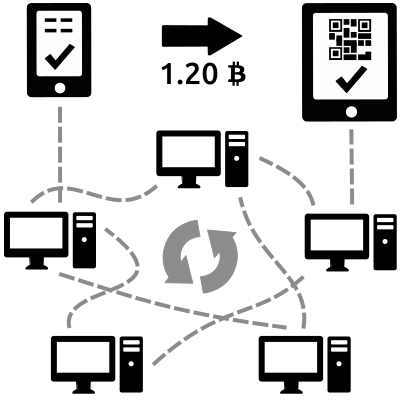
The block chain is a shared public ledger on which the entire Bitcoin network relies. All confirmed transactions are included in the block chain. This way, Bitcoin wallets can calculate their spendable balance and new transactions can be verified to be spending bitcoins that are actually owned by the spender. The integrity and the chronological order of the block chain are enforced with cryptography.
Transactions - private keys
A transaction is a transfer of value between Bitcoin wallets that gets included in the block chain. Bitcoin wallets keep a secret piece of data called a private key or seed, which is used to sign transactions, providing a mathematical proof that they have come from the owner of the wallet. The signature also prevents the transaction from being altered by anybody once it has been issued. All transactions are broadcast between users and usually begin to be confirmed by the network in the following 10 minutes, through a process called mining.
Processing - mining
Mining is a distributed consensus system that is used to confirm waiting transactions by including them in the block chain. It enforces a chronological order in the block chain, protects the neutrality of the network, and allows different computers to agree on the state of the system. To be confirmed, transactions must be packed in a block that fits very strict cryptographic rules that will be verified by the network. These rules prevent previous blocks from being modified because doing so would invalidate all following blocks. Mining also creates the equivalent of a competitive lottery that prevents any individual from easily adding new blocks consecutively in the block chain. This way, no individuals can control what is included in the block chain or replace parts of the block chain to roll back their own spends.
Read More
  • Share This:  
  •  Facebook
  •  Twitter
  •  Google+
  •  Stumble
  •  Digg

AIRTEL 6GB For #1500 Data Plan Subscription Code (Simcard Selective)

 Unknown     03:07:00     AFFORDABLE DATA PLANS     No comments   


Airtel NG is throwing its hat into the ring to challenge Globacom in the ongoing data plan war. Airtel announced the Airtel Special Privilege and it offers Airtel subscribers 6GB for just N1,500 with 1 month validity. The Airtel 6GB for 1500 is usable on all platforms and works well with both 2G and 3G networks.

FIRST DIAL (*440*161#) TO KNOW IF YOUR SIMCARD IS ELIDGIBLE BEFORE SUBSCRIBING

How to Get 6GB Airtel Data for 1,500 Naira
 Load your Airtel sim card with N1,500 airtime
 Dial *440*161# to subscribe
 Also dial *123*10# to check your data balance at any time.

Note that you don't need to be on any special Airtel tariff plan before you will qualify for this. Airtel is also cautious with the deduction of this Megabytes and from all experience, it is like the subscription is on a normal rate.

Read More
  • Share This:  
  •  Facebook
  •  Twitter
  •  Google+
  •  Stumble
  •  Digg

Do you use the Pro mode on your Samsung phone’s camera?

 Unknown     02:56:00     TECHNOLOGY NEWS     No comments   


One of the main features people look for when purchasing a new smartphone is a high-quality camera. For as long as I can remember, Samsung’s been competing with the big dogs in the shooter department — and it’s latest smartphones are no exception.

The Galaxy C9, Galaxy S7, Galaxy S7 edge all feature fantastic sensors, which are capable of capturing amazing photographs. However, that’s only half of the story; software plays a pretty big part in snapping images too.

Most users shoot in Auto, which, as its name suggests, automatically adjusts exposure, ISO and a vast array of other settings based on your environment to let you take the best possible picture of your subject in its surroundings.

Unfortunately, the Auto mode has always been the part of the equation that’s let smartphone manufacturers down. This has resulted in many mobile photographers using Pro modes to alter their camera settings manually.

It’s now reached a point though where Auto shooting is very accurate — especially on Samsung’s flagship devices — which has led to many people ditching the Pro option. This bodes the question: Do you use the Pro mode on your Samsung phone’s camera?


Read More
  • Share This:  
  •  Facebook
  •  Twitter
  •  Google+
  •  Stumble
  •  Digg

Galaxy S8 may be the first smartphone to feature Bluetooth 5.0

 Unknown     02:48:00     TECHNOLOGY NEWS     No comments   


It appears that the Galaxy S8 is going to be a smartphone of many firsts. The handset is likely to be the first smartphone to feature optical fingerprint recognition and we’ve now heard that there’s a possibility that the Galaxy S8 may be the first smartphone to come with Bluetooth 5.0.

Bluetooth 5.0 was officially adopted by the Bluetooth Special Interest Group as the latest version of the core specification last week. Bluetooth 5.0 promises faster speed, longer range and larger broadcast message capacity. It also provides improved interoperability and coexistence with other wireless technologies. Bluetooth SIG says that the latest standard has four times the range, two times speed and eight times broadcast message capacity as compared to Bluetooth 4.0. The group expects devices with Bluetooth 5.0 to arrive “within two to six months.”

Samsung is one of the members of the Bluetooth Special Interest Group and its upcoming flagship – the Galaxy S8 – in undoubtedly going to be one of the biggest smartphones of 2017. It makes perfect sense for the Galaxy S8 to be the first smartphone to feature the new Bluetooth standard.


Read More
  • Share This:  
  •  Facebook
  •  Twitter
  •  Google+
  •  Stumble
  •  Digg

Tuesday, 4 October 2016

How to Activate Your MTN Sim Card For 4G LTE Services

 Unknown     17:26:00     AFFORDABLE DATA PLANS     No comments   


MTN NG makes their 4G LTE service available for all states in Nigeria. Following the acquisition of Visafone by MTN earlier in 2016, they have launched their 4G network and makes 4G data plans available for Nigerians while some of the users are already enjoying it.


MTN 4G LTE only available in selected states before, it is now available in all states. To use MTN 4G data plan, you must be using a compatible phone and must have swapped your sim for MTN 4G sim card from any MTN office nearest to you before you can be part of MTN 4G evolution.

To make things simple, MTN Nigeria makes available a short message code that can be easily used to confirm if your smartphone is compatible. If compatible, you can then go to a nearest MTN office and swapped your sim for MTN 4G sim card.

To Check if Your Smartphone is Compatible with MTN 4G Service
Your phone must be 4G enabled. If not, don’t bother.
  • Simply text 4G to 131.
  • If your smartphone is compatible, you will receive a message that; Yello! Your device is 4G ready but you need to upgrade your SIM to enjoy MTN 4G LTE. Please visit the nearest MTN store or partner retailer for a sim swap now.
  • If your phone is not compatible, you will receive a message that; Yello! You need to upgrade your SIM card and device to enjoy MTN 4G LTE. Please visit the nearest MTN store or partner retailer to upgrade now.
  • If your Smartphone is compatible, visit the nearest MTN office and swapped your sim for MTN 4G sim card.
MTN 4G Data Plans and How to Subscribe
If you have confirmed your smartphone that it's compatible with MTN 4G network and you have swapped to MTN 4G compatible sim. Dial *444# to check and choose MTN 4G data plan suitable for you. Below are some of their available data plans.
  • 100MB for N500 (Valid for 7 days).
  • 150MB for N499 (Valid for 24 hours).
  • 200MB for N1000 (Valid for 30 days).
  • Unlimited data for N36,999 (Valid for 30 days).
  • 42GB for N66499 (Valid for 12 Months).
  • 10GB for N6000 (Valid for 30 days).
  • 15GB for N10,000 (Valid for 30 days).
If you have started using the MTN 4G service, can you tell us your view about the speed of their 4G network?
Read More
  • Share This:  
  •  Facebook
  •  Twitter
  •  Google+
  •  Stumble
  •  Digg

Glo Recently Increased Their Data Quantity: Get 3.2GB For 1K, 7.5GB For 2k, 10GB For 2.5K and Many More

 Unknown     17:02:00     AFFORDABLE DATA PLANS     1 comment   

Globacom still maintaining their status quo in-term of Offering Cheap and Affordable Data Bundles. 
Glo has once again boosted up the data volume of their various data plans, but still on the same affordable prize. Check out the new Glo data offer in the screenshot below;


Initially, we used to subscribe to 2GB data for 1k...
Glo has added 1.5GB extra data to the N2000 plan and 1.2GB to the N1,000 plan, another intro to 2GB+2.5GB on campus + N2000 airtime+500MB data to gift going for just N2,000. See the full list of the new data plans below:
1. 1.6GB for N500 valid for 10days
2. 3.2GB for N1,000 valid for 30days
3. 7.5GB for N2,000 valid for 30days
4. 10GB for N2,500 valid for 30days
5. 12GB for N3,000 valid for 30days
6. 18GB for N4,000 valid for 30days
7. 24GB for N5,000 valid for 30days
8. 48GB for N8,000 valid for 30days
9. 2GB + 2.5GB on Campus + N2,000 airtime + 500Mb data to gift for N2,000 valid for 30days
10. 5GB + 6.25GB on Campus + N5000 airtime + 1.25GB for N5,000 valid for 30days
To Subscribe
If the Glo network is good in your area, then the plan is for you. 
» Load the required amount of money on your Glo Sim. » Dial *777#, then choose Data Services » Buy Data » Monthly Plans.

» Follow the on-screen instructions as it is very simple.
Read More
  • Share This:  
  •  Facebook
  •  Twitter
  •  Google+
  •  Stumble
  •  Digg

Glo 4G LTE Network Is Out, Check Here if it's Available in Your Location

 Unknown     16:52:00     AFFORDABLE DATA PLANS     No comments   


Glo 4G LTE Services is now live in 9 Major Cities. The cities are;
Lagos, Abuja, PHC, Jos, Yola, Zaria, Benin, Warri and Eket. Other states are coming soon. 


How Can I Know if its in my City?
Dial *777# and select 4G LTE coverage.


Glo 4G LTE Data Plans.
Below are the Glo 4G LTE Data Plans that will be suitable for LTE users


1.6GB for N500 (7 Days Validity)
3.2GB for N1000 (30 days validity)
7.5GB for N2000 (30 days)
10GB for N2500 (30 days validity)
12GB for N3000 (30 days validity)
6… Click more to explore other plans.

I must sincerely congratulate Glo for this move, they may be slow like snail but they are moving. The only complain I’m expecting to see onward from you is that your Glo 10GB data doesn’t last a week because the speed will blow the data away.

#Airtel NG what are you waiting for?

Is Glo 4G LTE available in your location? Please use the comment form to share your Glo 4G LTE experience.
Read More
  • Share This:  
  •  Facebook
  •  Twitter
  •  Google+
  •  Stumble
  •  Digg

Thursday, 15 September 2016

Glo Latest Free Browsing Tweak 2016 Using UC Mini Handler

 Unknown     07:19:00     BROWSING TIPS     No comments   


This new free browsing method allows you to download large file and stream life videos but can't by use on other application sure as Facebook, Whatsapp, Twitter e.t.c but you can still enjoy this service using this social network on the browser.


HOW TO SETUP UC MINI HANDLER FOR GLO BROWSING TWEAK

To enjoy this latest free browsing trick simply start by downloading Uc Mini Handler Apk Android App from HERE
Launch the app and configure it as below
Proxy type: REAL HOST
Proxy server: redirect.glo.com
Real proxy type: default (you can also use
HTTP)
Real proxy port: 80
Then save and start browsing

One thing I notice is that at time you might have difficulties when downloading large files with this tweak. What you simply do is to visit this site with your Uc mini handler muchproxy.com. Then add the name of the site you want to download from, click go and your download will start

When you finish downloading the files, you will noticed that muchproxy normally rename the file .php format. Don't worry, just change the .php extension to he format of the file you are downloading. That is, when you are downloading an .mp4, .apk, .exe .pdf file, when the download option popup before downloading just change the .php to you appropriate file extension.
Read More
  • Share This:  
  •  Facebook
  •  Twitter
  •  Google+
  •  Stumble
  •  Digg

Airtel 6GB for N1500 Best and Cheapest Airtel Data Plan. (Sim Selective)

 Unknown     06:59:00     AFFORDABLE DATA PLANS     No comments   


Dial *440*161# to check eligibility before Recharging!!! 

We are still in the race! With this latest Airtel 6GB for N1,500 you can browse and download without looking back! Although, it is cheap but it also  works for Blackberry Phones!
Are you using Android device, PC, iPhone, iPad, Blackberry device in Nigeria? Then this new Airtel Data Bundle Plan will really make your day and month amazing! Even after subscribing to other Airtel plans, this Airtel is one of many!

This is the message, “Special Privileged!! Enjoy 6GB worth of data for just N1500. Dial *440*161# for 30 days. Usable on all devices. From Airtel Nigeria” So you can see that it is official from Airtel, all you have to do is to recharge your sim with N1200 and not N1500 then dial the code, you are good to go!

The message is clear! You don’t need any tweak or so. You don’t need to download any Psiphon of a stuff, you don’t have to change your IMEI to get this bundle.

Just recharge your Airtel Sim with N1500 and dial *440*161# that is all.
And remember that it is valid for 30 days only!
And after subscribing to the data bundle, you can check your data balance at any time, simply by dialing *123*10# or *140# – And also, it works on Sim Card, it doesn’t select sim card, it doesn’t make use of ONLY old or new sim but it is valid for all sim card.
Read More
  • Share This:  
  •  Facebook
  •  Twitter
  •  Google+
  •  Stumble
  •  Digg

Elon Musk Asks for Help Solving SpaceX Rocket Explosion

 Unknown     05:30:00     TECHNOLOGY NEWS     No comments   


Billionaire entrepreneur Elon Musk, CEO and founder of the private spaceflight company SpaceX, is asking for help from NASA and the public in figuring out what happened when one of the company's Falcon 9 rockets exploded on Sept. 1.
"If you have audio, photos or videos of our anomaly last week, please send to report@spacex.com. Material may be useful for investigation," Musk tweeted today at 11:44 a.m. EDT (1544 GMT). 
The explosion took place two days before the scheduled launch of the rocket, during a routine prelaunch operation at Cape Canaveral Air Force Station's Space Launch Complex 41 in Florida. Based on tweets from Musk in the last 10 hours, the cause of the explosion appears to be completely mystifying the company's staff. [SpaceX Rocket Explosion Aftermath Captured on KSC Launch Pad Video]
Musk also tweeted directly at NASA, the Federal Aviation Administration, and the Air Force Personnel Accountability and Assessment System (because Cape Canaveral is an Air Force Station), asking for assistance. 
"Support & advice from @NASA, @FAA, @AFPAA & others much appreciated. Please email any recordings of the event to report@spacex.com," he wrote.
If you have audio, photos or videos of our anomaly last week, please send to report@spacex.com. Material may be useful for investigation
— SpaceX (@SpaceX) September 9, 2016

A public conversation

Musk tweeted about the loss of the Falcon 9 hours after the incident, noting that the explosion appeared to originate "around upper-stage oxygen tank" but the cause was "still unknown." SpaceX provided more updates about the incident on Sept. 2. 
Then, Musk's account went quiet until about 12:30 a.m. EDT this morning (0030 GMT), when he began tweeting actively about the explosion. 
"Still working on the Falcon fireball investigation. Turning out to be the most difficult and complex failure we have ever had in 14 years," Musk wrote. "Important to note that this happened during a routine filling operation. Engines were not on, and there was no apparent heat source.
"Particularly trying to understand the quieter bang sound a few seconds before the fireball goes off. May come from rocket or something else," he said. 
Musk also answered questions and responded to comments from the public.
When Twitter user @ashwin7002 tweeted at Musk that "there are some videos on YouTube claiming something hit the rocket. Any reality there?" Musk replied, "We have not ruled that out." 
Twitter user Matt Stohrer wrote, "that sound at 0:54 sounds like a metal joint popping under stress. e.g. weld failing on strut, welded seam bursting, etc." Musk replied, "Most likely true, but we can't yet find it on any vehicle sensors."
Twitter user Eric Bowen asked if the company's Dragon spacecraft would have survived the event. Musk replied, "yes. This seems instant[aneous] from a human perspective, but it [was] really a fast fire, not an explosion. Dragon would have been fine."
The Sept. 1 explosion also destroyed the rocket's payload, the AMOS-6 communications satellite, which was co-leased by Facebook and intended to bring internet connectivity to parts of Africa. 
Musk also made multiple tweets apologizing for a delay in writing a blog post about Autopilot, an autonomous crash-avoidance technology offered in electric cars made by Tesla (Musk's other company). When another commenter joked about the delay, Musk replied, "It's been a little crazy lately."
Read More
  • Share This:  
  •  Facebook
  •  Twitter
  •  Google+
  •  Stumble
  •  Digg

Samsung blames manufacturing flaw for exploding Galaxy Note 7 batteries

 Unknown     05:14:00     TECHNOLOGY NEWS     No comments   


Samsung has already provided some explanation about what’s causing Galaxy Note 7 batteries to explode and now an unpublished report that the company provided to regulators in South Korea reveal the reason why Samsung has had to recall 2.5 million units of the Galaxy Note 7 merely weeks after the handset was launched. Samsung submitted this report to the Korea Agency for Technology and Standards earlier this month and in it the company blames a small manufacturing flaw for the exploding batteries.
The company says that its preliminary findings reveal that there was a manufacturing flaw which placed pressure on plates inside the battery cells. This is what caused the negative and positive poles in the battery to come into contact and trigger excessive heat which ends up burning the device itself. Samsung says that it continues to investigate this battery issue with its battery manufacturers and that it’s going to carry out thorough analysis to find out “the exact cause” of this issue.
Samsung SDI is widely believed to have supplied these faulty batteries for the Galaxy Note 7. Recent reports suggest that Samsung will now be sourcing batteries for the Galaxy Note 7 from China’s ATL exclusively, at least until such time when battery cells created by its battery-making division for the Galaxy Note 7 are not a fire hazard.
Update: A recent Bloomberg report reveals the following about the Galaxy Note 7′s penchant for overheating and burning:
“The batteries failed because a separator within the cells was too thin and electrodes weren’t properly insulated, according to a government quality inspection agency in China.” Once again, Samsung SDI has been named as the supplier responsible for this debacle.
Read More
  • Share This:  
  •  Facebook
  •  Twitter
  •  Google+
  •  Stumble
  •  Digg

Sunday, 4 September 2016

Get Airtel 10gb For #100 and 20gb For #200 while #300 for unlimited data

 Unknown     04:50:00     AFFORDABLE DATA PLANS     No comments   

How To Activate
=> Make sure you have at least N100, N200 or N300 don your line, depending on the plan you want to subscribe for.
=> Dial *686# on your phone
=> Reply with 1, 2 or 3 for either 10gb, 20gb or unlimited plan respectively.
=> You will get a confirmation message afterwards.
=> That's all. It's as simple as that.
This plan actually works on Opera mini and other social apps like Facebook, Facebook messenger, WhatsApp, bbm etc. You can even stream or download with it.

Read More
  • Share This:  
  •  Facebook
  •  Twitter
  •  Google+
  •  Stumble
  •  Digg

Wednesday, 1 June 2016

Glo Introduced Cheapest Data Rate In The History Of Nigerian ISP Data Subscriptions

 Unknown     07:19:00     AFFORDABLE DATA PLANS     No comments   


Glo has finally introduced the cheapest data subscription rate and value in the history of Nigeria. .
Glo current data subscription rate and value.
1. N1000·2GB 30Days
2. N2000·6GB 30Days
3. N2500·10GB 30Days
4. N3000·12GB 30Days
5. N4000·18GB 30Days
6. N5000·24GB 30Days
7. N8000·48GB 30Days
To subscribe to any of the cheap Monthly data plans from Glo just Dial *777# and follow the prompts.
Read More
  • Share This:  
  •  Facebook
  •  Twitter
  •  Google+
  •  Stumble
  •  Digg

MTN New SmartPack unlimited Surfing

 Unknown     07:13:00     AFFORDABLE DATA PLANS     No comments   


Mtn introduces SmartPack unlimited plan
How to Activate MTN Startpack Plan?
1. Firstly, get a New MTN line
2. Recharge the line with the normal recharge procedure, using *555*pin# and you’ll be rewarded with 6times bonus on every recharge
3. You can check bonus balance or plan using *559*17#
Read More
  • Share This:  
  •  Facebook
  •  Twitter
  •  Google+
  •  Stumble
  •  Digg
Newer Posts Older Posts Home

Popular Posts

  • Call of Duty: Strike Team Android
    Game description:   Call of Duty: Strike Team : Call of Duty: Strike Team  - the USA was unexpectedly attack...
  • Stable Nougat 7.1.1 Rom For Infinix Note 3 Pro
    Hi everybody and users of Infinix Note 3 ace, here is something useful for all Infinix note 3 star users, its M.A.D Aosp in view of Android...
  • Completely Unlocked FIFA 14 v1.3.6 Mod and Data (No Root) Download, Install And Play
      EA Sport Android FIFA 14 has been the best Android football HD diversion so far because of its HD design, realness, disconnected elem...
  • Best 20 PPSSPP Games To Download & Enjoy On Your Android, Windows, iOS, BlackBerry 10 and Other Devices
      PPSSPP (an acronym for "PlayStation Portable Simulator Suitable for Playing Portably") is a free and open-source PSP emulat...
  • OS 10.3.2.2789 for all devices and Autoloaders
    OS and Radio links for SR 10.3.2.2514 (OS 10.3.2.2789 + Radio 10.3.2.2790) *  Operating Systems * QC8974: Blackberry Passport (Debric...

Blog Archive

  • ►  2017 (43)
    • ►  October (4)
    • ►  August (6)
    • ►  April (2)
    • ►  March (17)
    • ►  February (14)
  • ▼  2016 (31)
    • ▼  December (4)
      • What is Bitcoin? And How does Bitcoin Work?
      • AIRTEL 6GB For #1500 Data Plan Subscription Code (...
      • Do you use the Pro mode on your Samsung phone’s ca...
      • Galaxy S8 may be the first smartphone to feature B...
    • ►  October (3)
      • How to Activate Your MTN Sim Card For 4G LTE Services
      • Glo Recently Increased Their Data Quantity: Get 3....
      • Glo 4G LTE Network Is Out, Check Here if it's Avai...
    • ►  September (5)
      • Glo Latest Free Browsing Tweak 2016 Using UC Mini ...
      • Airtel 6GB for N1500 Best and Cheapest Airtel Data...
      • Elon Musk Asks for Help Solving SpaceX Rocket Expl...
      • Samsung blames manufacturing flaw for exploding Ga...
      • Get Airtel 10gb For #100 and 20gb For #200 while #...
    • ►  June (2)
      • Glo Introduced Cheapest Data Rate In The History O...
      • MTN New SmartPack unlimited Surfing
    • ►  May (13)
    • ►  April (1)
    • ►  January (3)
  • ►  2015 (111)
    • ►  November (6)
    • ►  October (93)
    • ►  September (12)

Labels

  • AFFORDABLE DATA PLANS
  • ANDROID
  • BLACKBERRY
  • BROWSING TIPS
  • COMPUTERS
  • IOS
  • NOKIA
  • ONLINE BANKING
  • TECHNOLOGY NEWS
  • WINDOWS PHONE

Translate

Powered by Blogger.

Categories

ANDROID (61) TECHNOLOGY NEWS (26) AFFORDABLE DATA PLANS (24) COMPUTERS (24) IOS (22) BROWSING TIPS (13) NOKIA (9) BLACKBERRY (7) WINDOWS PHONE (4) ONLINE BANKING (2)

Copyright © Home Of Technology | Powered by Blogger
Design by Ememovic™