Home Of Technology
  • Home
  • About
  • Contact
  • DMCA/PRIVACY
  • Home
  • Mobile
    • Android
    • iOS
    • BLACKBERRY
    • NOKIA
    • WINDOWS PHONE
  • PC tutorials/apps
  • Browsing Tips
  • ONLINE BANKING
  • TECH NEWS

Wednesday, 18 October 2017

Microsoft Edge Browser Now Available For Android

 Unknown     09:08:00     ANDROID, TECHNOLOGY NEWS     No comments   


microsoft-edge-for-ios-android.jpg

Microsoft Edge is a well-known browser that was developed by Microsoft, it came as a default browser on windows 10. It was designed to be a light weight browser and it was integrated with Cortana.
Microsoft Edge Browser is now ported to Android Operating System and it’s already available for download.
The browser had already been made available to 10k Apple users for TestFlight apps, so it isn’t available yet for iOS users to download.
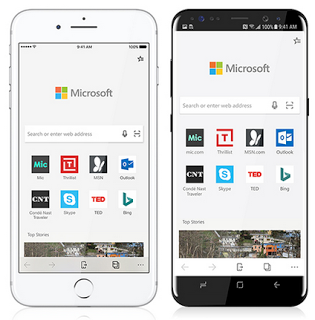
Microsoft Edge.png
Microsoft Edge Browser is made primarily for those who already use Edge Browser on Computers and would want to synchronize their passwords, bookmarks, history, saved pages on their mobile version of Edge Browser.
The Android version of Microsoft Edge Browser is available globally, it isn’t constrained to those in the U.S.
Edge Browser enables users to flawlessly work interchangeably between a mobile phone and a desktop computer.
The Application came with several enticing features like QR Code Reader, InPrivate, Reading view, Data Sync, Hub view and many more.

Where would I be able to download it?

Although the app is still in a Preview phase, this means that lots of features are incoming.
Download the application from Google Playstore HERE

What do you think about the browser?

Will it supersede other browsers like Firefox, Google chrome and Samsung browser?



oceanofapk_progress.gif


Image source: 1 - 2 - 3
Read More
  • Share This:  
  •  Facebook
  •  Twitter
  •  Google+
  •  Stumble
  •  Digg

Recover Deleted Photos or Data On Your Android & iOS Devices

 Unknown     09:06:00     ANDROID, IOS     1 comment   


We usually delete some unwanted pictures on our smart phones and some times, we delete valuable pictures unintentionally, and we've coincidentally deleted an entire collection of vacation pictures or possibly someone wiped your data accidentally.


Disckdigger.png
One thing to remember, once you've erased your photos or other files, it isn't safe to use your smart phone until the files are recuperated. When you delete any data on your device, it is not permanently deleted, it just creates space for more data. Any activity you carry out on your smart phone like taking new photos can create new data and overwrite that space, making the recovery of lost files impossible.
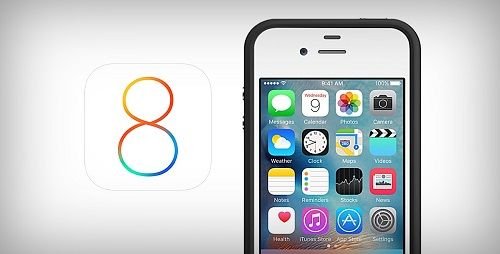
On iOS 8 firmware, Apple made photo recovery possible, making it easy to recover lost photos, but when it comes to recouping erased photos from Android smartphones and memory cards you'll require a little help from a third party application.
However, some Android smartphones now accompany recovery feature. An example of such device is Gionee M6, when you erase a photo on it, it will be put away in a virtual memory space and after one week (7 days), it will then be deleted permanently.
This tutorial will help you recover your lost data or photos on your Android or iOs devices.


How to recover deleted photos on an iPhone device running on iOS 8

iOS-8-for-iPhone-4.jpg


Here’s how to get it done:


  • Launch your Photos Application and go into your albums.
  • Navigate to the bottom and click on "Recently Deleted."
  • Inside that folder, you’ll see all the photos you’ve erased during the past thirty days. To recover you just need to tap the photo you need and press "Recover." You can likewise press "Delete" to permanently delete that photo.
If you are trying to recover photos that are older than 30 days, you’ll need to restore your phone with a saved backup or restore your phone utilizing a saved backup on iTunes or use a third party photo recovery application.


How to recover deleted photos on Android Smart Phones

oceanofapk_progress.gif


There are various applications on Google Playstore that can help you recover your lost photos, but I’ll recommend DiskDigger because it’s fast and easy to utilize.
DiskDigger is an Android application that helps you recover deleted photos on your Android smartphone.
It is very easy to use and it works even without your device being rooted.
It can recover lost photos from your device internal storage and your SD card. But if your Android smartphone is rooted, the application will search all of your device’s memory for photos and videos. If your Android smartphone isn’t rooted, the app does a limited scan by searching for thumbnails and cache.
But there are other ways of recovering deleted photos on your device, if you enabled scheduled automatic backup on either Googledrive app or Dropbox app, you can always download them back.
DiskDigger has two versions, the free and premium version. DiskDigger pro version cost $1.6 on Android Playstore. The advantage of the premium app is that you can recover other data apart from photos.
I’ll provide a direct link for the activated premium version
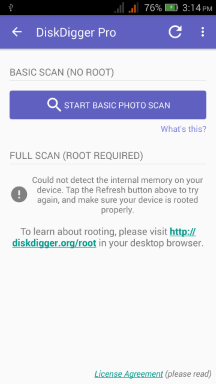
disckdigger-pro.png
Download DiskDigger application on Android Playstore here
Download DiskDigger activated premium version here

How to recover your photos with DiskDigger application


  • Launch the DiskDigger application and tap on "Start Basic Photo Scan", a list of recently deleted files will be displayed for you to recover.
  • When you see the photo you intend to recover, simply select it and click "Recover" button at the top.
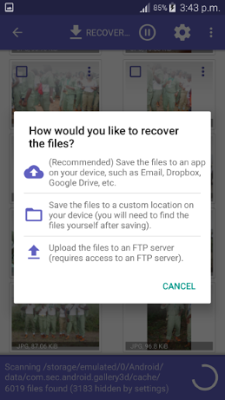
  • The application will then ask you to select the destination folder where you want the recovered photo to be stored, either internal memory or SD card.
file-recovery.png
Read More
  • Share This:  
  •  Facebook
  •  Twitter
  •  Google+
  •  Stumble
  •  Digg

Monday, 9 October 2017

UC Browser is More Than Just a Browser

 Unknown     14:04:00     No comments   


Today I’ll be expounding a vital component of UC Browser (PC) you might have known before, but for the benefit of others who doesn’t know.


UC Browser is a well-known internet browser right from the days of java & Symbian phones to present Android OS and computers running on windows, mac or Linux operating system.
It has one of the best download managers with speed boost, accelerated page loading, video grabber, Built in Ad-block e.t.c.
It also has one feature “Virtual wifi” that made it stand out from other web browsers.


images.jpg


With “Virtual wifi”, you can share your PC’s internet connection to other devices within your premises.
You may find yourself in a location where Wi-Fi isn’t available, the only access to the internet could be through Ethernet cables via "local area network" (LAN) and you might want to share the internet connection to your smart phones, tablet and other devices that aren’t Ethernet supported.
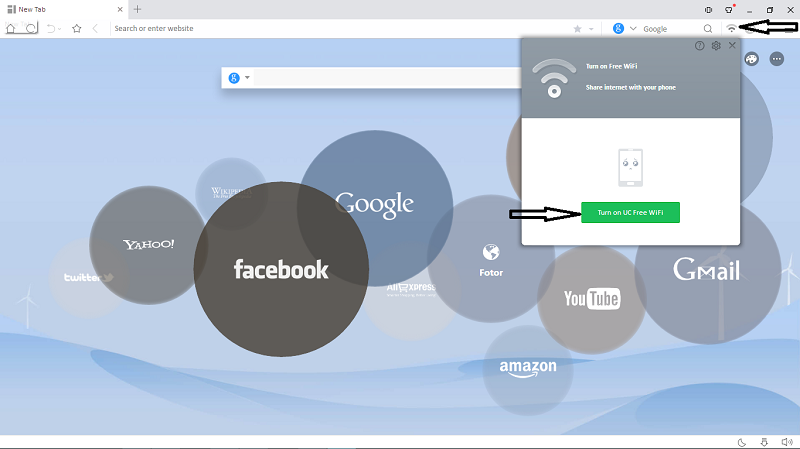
Virtual wifi will do the magic for you, simply download Uc Browser, install and launch Virtual wifi.


uc4.png
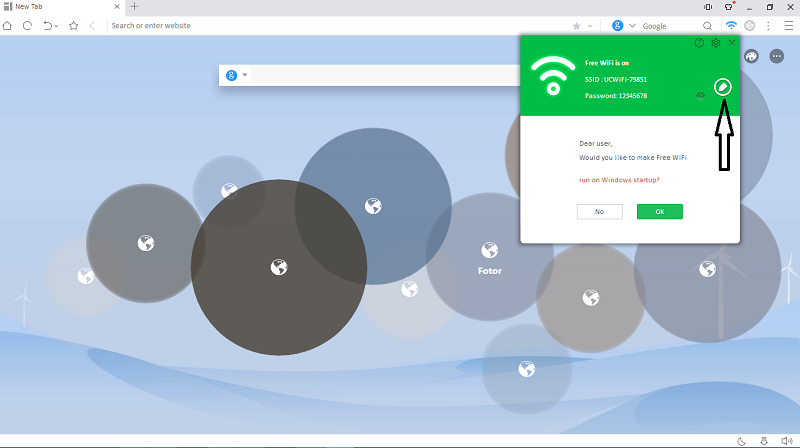
uc3.png
Once it’s connected, edit and change your Wi-Fi name and password. Connect your devices and enjoy.
You can decide to run it on windows start up
Make sure your drivers are up-to-date, else you might experience Blue Screen of Death (BSOD).

I hope you find this useful.

Read More
  • Share This:  
  •  Facebook
  •  Twitter
  •  Google+
  •  Stumble
  •  Digg

Sunday, 8 October 2017

Why You Should Start Using VPN

 Unknown     08:06:00     No comments   


The word “VPN” might not sound new to you, you may have come across the word at one or two occasion via the internet, mobile phones or computers.


VPN is an abbreviation of  "Virtual Private Network" and the most vital thing you need to know about VPN is that it secures your device's internet connection, it ensures that all the packet data which is sent and received are secured and encrypted from prying eyes. It enables you to surf anonymously knowing fully well that your online activities are secured and hidden from spies, this could be either hackers, Internet Service Provider (ISP) or Government.

VPN comes pre-installed on your android smart phones which is accessible through the settings, likewise windows pc via Network and sharing center.


Setting up a VPN connection might not be easy for Nobs, it may require networking skills, that’s why there are several VPN software’s out there that comes pre-configured with necessary settings, once installed, you need not put any additional settings unless you want to change your I.P (location). Although they aren’t free, they’re paid VPN services that come with weekly, monthly, yearly and lifetime subscription fees.


Pros of using a VPN.


1.    VPN is a private network, this implies that it is secure to carry out internet transactions with 100% safety guaranteed.

2.    VPN allows you to surf the internet anonymously in such a way that your Internet Protocol (IP) address will not be traced.

3.    With VPN, you can be surfing on highly secured connections and could be able to dodge some of the publicly distributed online malwares, spywares, worms, adware, back doors, bots, virus such as Trojans etc.

4.    There are some websites you can’t visit, you can’t even view its content if you’re from a particular area, for such, VPN will do the magic, and unravel the contents for you.


 Cons of using a VPN.


1.    Some VPN software can slow down your smart phone or windows PC, Its RAM consumption might be massive.

2.    Downloading freeware VPN software to your device can put your device at risk, exposing it to various kinds of malwares and viruses like the recent "ExpensiveWall" malware on Google playstore that has infected more than 21million Android devices.

3.    If the VPN service is free, then you aren’t safe. Moreover the company providing the service has to find a way of remaining in business, maintaining their servers and paying their staffs. So it’s either you pay for premium services or use freeware VPN services that might do you more harm than good.
Read More
  • Share This:  
  •  Facebook
  •  Twitter
  •  Google+
  •  Stumble
  •  Digg
Newer Posts Older Posts Home

Popular Posts

  • Call of Duty: Strike Team Android
    Game description:   Call of Duty: Strike Team : Call of Duty: Strike Team  - the USA was unexpectedly attack...
  • Stable Nougat 7.1.1 Rom For Infinix Note 3 Pro
    Hi everybody and users of Infinix Note 3 ace, here is something useful for all Infinix note 3 star users, its M.A.D Aosp in view of Android...
  • Completely Unlocked FIFA 14 v1.3.6 Mod and Data (No Root) Download, Install And Play
      EA Sport Android FIFA 14 has been the best Android football HD diversion so far because of its HD design, realness, disconnected elem...
  • Best 20 PPSSPP Games To Download & Enjoy On Your Android, Windows, iOS, BlackBerry 10 and Other Devices
      PPSSPP (an acronym for "PlayStation Portable Simulator Suitable for Playing Portably") is a free and open-source PSP emulat...
  • OS 10.3.2.2789 for all devices and Autoloaders
    OS and Radio links for SR 10.3.2.2514 (OS 10.3.2.2789 + Radio 10.3.2.2790) *  Operating Systems * QC8974: Blackberry Passport (Debric...

Blog Archive

  • ▼  2017 (43)
    • ▼  October (4)
      • Microsoft Edge Browser Now Available For Android
      • Recover Deleted Photos or Data On Your Android & i...
      • UC Browser is More Than Just a Browser
      • Why You Should Start Using VPN
    • ►  August (6)
    • ►  April (2)
    • ►  March (17)
    • ►  February (14)
  • ►  2016 (31)
    • ►  December (4)
    • ►  October (3)
    • ►  September (5)
    • ►  June (2)
    • ►  May (13)
    • ►  April (1)
    • ►  January (3)
  • ►  2015 (111)
    • ►  November (6)
    • ►  October (93)
    • ►  September (12)

Labels

  • AFFORDABLE DATA PLANS
  • ANDROID
  • BLACKBERRY
  • BROWSING TIPS
  • COMPUTERS
  • IOS
  • NOKIA
  • ONLINE BANKING
  • TECHNOLOGY NEWS
  • WINDOWS PHONE

Translate

Powered by Blogger.

Categories

ANDROID (61) TECHNOLOGY NEWS (26) AFFORDABLE DATA PLANS (24) COMPUTERS (24) IOS (22) BROWSING TIPS (13) NOKIA (9) BLACKBERRY (7) WINDOWS PHONE (4) ONLINE BANKING (2)

Copyright © Home Of Technology | Powered by Blogger
Design by Ememovic™