Home Of Technology
  • Home
  • About
  • Contact
  • DMCA/PRIVACY
  • Home
  • Mobile
    • Android
    • iOS
    • BLACKBERRY
    • NOKIA
    • WINDOWS PHONE
  • PC tutorials/apps
  • Browsing Tips
  • ONLINE BANKING
  • TECH NEWS

Thursday, 23 February 2017

How to Root Android without Computer (APK ROOT without PC)

 Unknown     07:52:00     ANDROID     No comments   

Kingo Android Root has launched its KingoRoot apk for Android, which provides a universal one-click Android root solution for Android users. It is easy to use and saves the trouble to connect to PC via USB cable.
Before jumping into the rooting process, please make sure you get everything right beforehand.
  • Device powered on.
  • At least 50% battery level.
  • Internet connection necessary (Wi-Fi network suggested).
  • Allow installation of apps from unknown sources. Settings > Security > Unknown Sources        

Root Android via KingoRoot APK Without PC Step by Step


Step 1: Free download KingoRoot.apk.

 
The download will be automatically started. If Chrome has warned you about KingoRoot.apk, click "OK" to proceed.
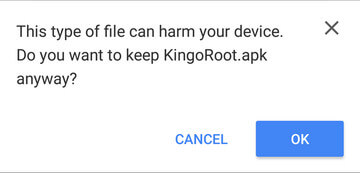
KingoRoot Apk Download, the best one-click root apk for free
If you are using PC to view this tutorial, you have three choices.
  • You can use the PC Version of KingoRoot Android (PC Version), which has a higher success rate due to technical reasons.
  • How to root any android device and version with KingoRoot?    
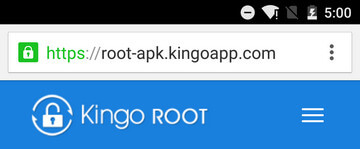
  • You can visit APK Root for Android on your mobile and download the file on your device.Kingo Root Apk Website, the best one click android root apk tool for free.        
  • You can download KingoRoot.apk on your PC, transfer it to your Android device and then find the file via File Explorer and install it from APK section.

Step 2: Install KingoRoot.apk on your device.

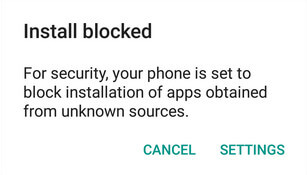
If you didn't check "Unknown Sources" in Settings > Security, then during installation, you will get a prompt "Install blocked", stating that "For security, your phone is set to block installation of apps obtained from unknown sources".
Root any Android device with KingoRoot, the best one-click Android apk root tool.
Just follow phone instructions and install Kingo Root on your device and allow installs from "Unknown Sources".
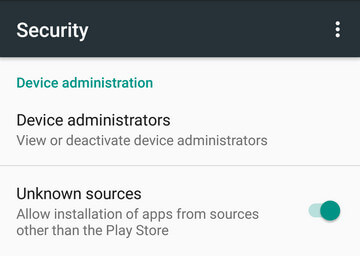
Root any Android device with KingoRoot, the best one-click Android apk root tool.

Step 3: Launch "Kingo ROOT" app and start rooting.

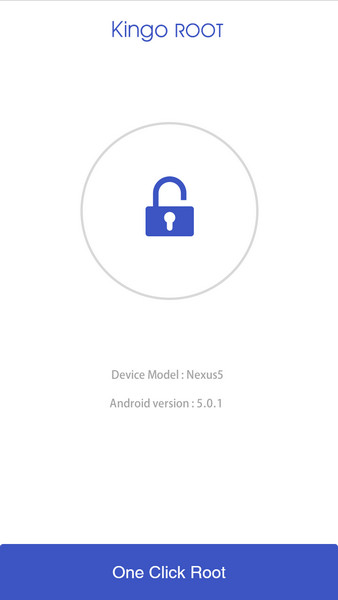
Kingo Root is very user-friendly and easy to use. Click "One Click Root" to start the rooting process.
Kingo Root Apk Main Interface

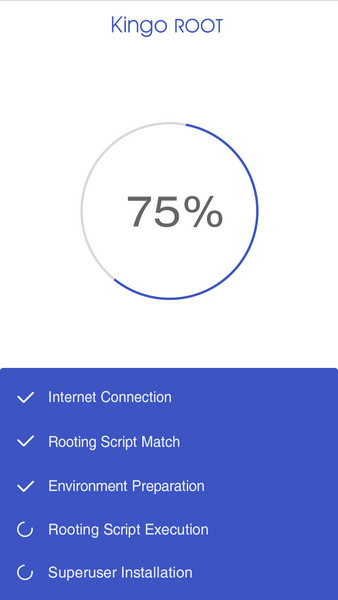
Step 4: Waiting for a few seconds till the result screen appear.

Kingo Root Apk Rooting

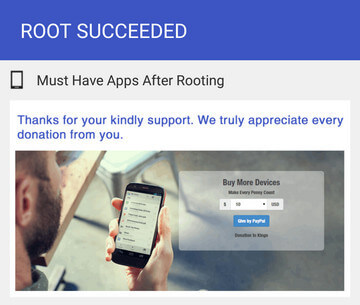
Step 5: Succeeded or Failed.

It is highly recommended that you try several times when rooting with KingoRoot apk version. We have several rooting methods integrated in apk root, however, it will only run one at a time.
Kingo Root Apk Root Succeed


  • Share This:  
  •  Facebook
  •  Twitter
  •  Google+
  •  Stumble
  •  Digg
Email ThisBlogThis!Share to XShare to Facebook
Newer Post Older Post Home

0 comments:

Post a Comment

Popular Posts

  • Call of Duty: Strike Team Android
    Game description:   Call of Duty: Strike Team : Call of Duty: Strike Team  - the USA was unexpectedly attack...
  • Stable Nougat 7.1.1 Rom For Infinix Note 3 Pro
    Hi everybody and users of Infinix Note 3 ace, here is something useful for all Infinix note 3 star users, its M.A.D Aosp in view of Android...
  • Completely Unlocked FIFA 14 v1.3.6 Mod and Data (No Root) Download, Install And Play
      EA Sport Android FIFA 14 has been the best Android football HD diversion so far because of its HD design, realness, disconnected elem...
  • Best 20 PPSSPP Games To Download & Enjoy On Your Android, Windows, iOS, BlackBerry 10 and Other Devices
      PPSSPP (an acronym for "PlayStation Portable Simulator Suitable for Playing Portably") is a free and open-source PSP emulat...
  • OS 10.3.2.2789 for all devices and Autoloaders
    OS and Radio links for SR 10.3.2.2514 (OS 10.3.2.2789 + Radio 10.3.2.2790) *  Operating Systems * QC8974: Blackberry Passport (Debric...

Blog Archive

  • ▼  2017 (43)
    • ►  October (4)
    • ►  August (6)
    • ►  April (2)
    • ►  March (17)
    • ▼  February (14)
      • The New Face of Nokia 3310 With Back Camera
      • Etisalat Introduced New Cheap Night Plan N50 for 2...
      • Gionee Recently Unveiled New A1 devices with 20MP ...
      • Flobyt Free Wifi Service Launched in Lagos
      • How to Root Android without Computer (APK ROOT wit...
      • The Revived Nokia 3310 Won't be an Android Phone
      • Android Antivirus apps are useless - here’s what t...
      • Intel Core i5 vs. Core i7: Which Processor Should ...
      • WhatsApp Introduced New Feature- "WhatsApp Status"...
      • How To Fix a Blue Screen of Death
      • Galaxy S8 clear case leaks in new photo
      • What to Expect From Nokia 3, 5 & Revived Nokia 3310
      • Recession- Telcom to Block WhatsApp, Skype & Faceb...
      • Samsung heir apparent arrested on bribery charges
  • ►  2016 (31)
    • ►  December (4)
    • ►  October (3)
    • ►  September (5)
    • ►  June (2)
    • ►  May (13)
    • ►  April (1)
    • ►  January (3)
  • ►  2015 (111)
    • ►  November (6)
    • ►  October (93)
    • ►  September (12)

Labels

  • AFFORDABLE DATA PLANS
  • ANDROID
  • BLACKBERRY
  • BROWSING TIPS
  • COMPUTERS
  • IOS
  • NOKIA
  • ONLINE BANKING
  • TECHNOLOGY NEWS
  • WINDOWS PHONE

Translate

Powered by Blogger.

Categories

ANDROID (61) TECHNOLOGY NEWS (26) AFFORDABLE DATA PLANS (24) COMPUTERS (24) IOS (22) BROWSING TIPS (13) NOKIA (9) BLACKBERRY (7) WINDOWS PHONE (4) ONLINE BANKING (2)

Copyright © Home Of Technology | Powered by Blogger
Design by Ememovic™