

I came up with this article because my smartphone battery was draining unnecessarily today, and i got it fixed in few minutes.
One of the major issues smartphone users normally complain of is ''battery'' It's either the phone battery is bad, drain so fast or doesn’t last as expected. Obviously, most people who buy smartphones do not check the battery capacity. Some smartphones batteries are disaster in the making. Charge it and after 30min, you are charging it again.
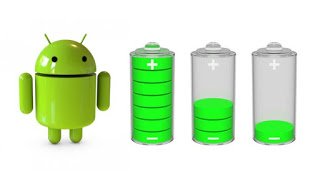
In this article, I’m going to be showing you 11 ways to make your smartphone battery last longer than expected.
11 Ways to Make Your Smartphone Battery Last Longer
1. Avoid Keeping Your Phone in a Hot or Heated Surface:Most smartphones have battery made of either Lithium ion or Lithium Polymer battery. These two elements used for production of cell phone batteries are badly affected when there are exposed to heat and this leads to drastic drain of the battery.
Make sure you device is always in a cool environment.
2. Turn on Power Saving Mode:Power saving mood help to conserve your cell battery, this feature limits you to necessary functions like call, messages, time, contacts etc. It saves your battery up to 90%, releasing more power to your cell. So when you don’t need internet service in your mobile phone put it in power saving mood. Or when you battery gets to 50%, put it in Power Saving Mode.
To turn on Power saving mode, go to settings>>battery>> by the right side, click on battery saver and turn it on.
3. Dim The Screen Brightness or Use Auto Brightness: 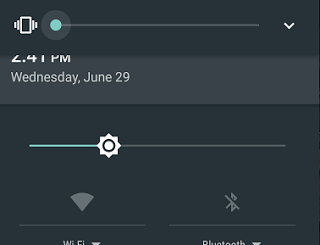
Phone brightness consumes 30% of your battery. Make your battery last longer by setting the screen brightness to auto so that it can adjust to indoor and outdoor lighting.
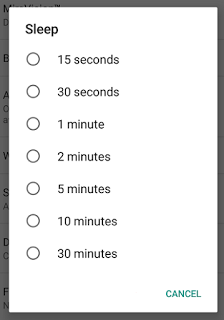
4. Keep The Screen Timeout Short:Every seconds here count. Go to settings>>Display and hit the Sleep button. Set it to 30 seconds or 15seconds.
5. Turn Off Your Bluetooth:No matter now much you love using Bluetooth with your hands-free headset, your wireless speaker or activity tracker, the extra radio is constantly listening for signals from the outside world. Hence consuming your phone battery.
6. Switch Off The GPS Tracking:Only use your GPS when navigation and location services are necessary. GPS tracking consumes a lot of energy, tracking your location via radio waves and satellites will surely give you a dead cell.
7. Turn Off All Auto Updates:Most smartphones especially iPhones try to keep you updated by automatically installing new version of apps when they come out. Visit the store of the device you are using to deactivate.
8. Turn Off Background App Refresh:Background App Refresh is a setting that allows apps to get updated with the latest content while you're not using them. It downloads the latest news or updates to an app. It's an awesome feature because it keeps your phone current, but it takes up a lot of battery life.
To disable go to Settings > General > Background App Refresh and turn it off.
9. Turn off Location Services:Go to Settings > Privacy > Location Services to disable.
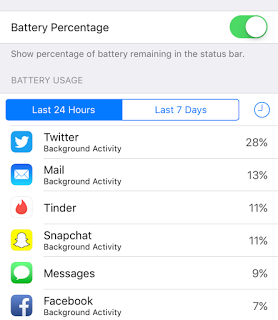
10. Check which apps use the most battery:If you go to Settings > Battery, you can check to see which apps take up the most battery. Disable it.
11. Don't Use The Camera Flash in daylight:Turn on Camera Flash only at night, Flash drains your battery life. So turn it off!
My smartphone battery takes me 48 hours without charging... Now tell me, how long does your smartphone battery take you?


0 comments:
Post a Comment