Home Of Technology
  • Home
  • About
  • Contact
  • DMCA/PRIVACY
  • Home
  • Mobile
    • Android
    • iOS
    • BLACKBERRY
    • NOKIA
    • WINDOWS PHONE
  • PC tutorials/apps
  • Browsing Tips
  • ONLINE BANKING
  • TECH NEWS

Friday, 4 August 2017

How to Perform Reverse Image Search on Google & Facebook Using Your Mobile Phone

 Unknown     05:46:00     BROWSING TIPS, TECHNOLOGY NEWS     No comments   


This tutorial might be useful to those who aren't aware of some capabilities of Google Search Engine.

Google Reverse Search lets you search by images instead of keywords. Upload a picture from your desktop, tablet or mobile phone, and Google will show all the other web pages on the Internet that have similar images.
Reverse Search is useful for verifying the source of photographs, WhatsApp images, screenshots and memes. Tinder and Facebook users have used "Search by Image" to research profile pictures of their potential dates while travelers use it for finding the photo's location.

You can do Reverse Image Search on mobile or PC depending on what is convenient for you without installing any applications.
How to do Reverse Image search?
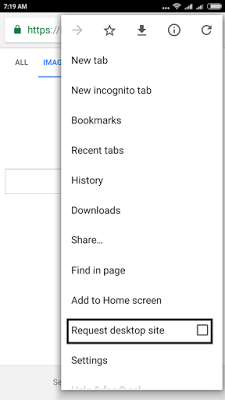
1 Go to images.google.com on PC and if you are using a Mobile Phone, open same url using Google chrome, request for desktop site as seen below
1.png
2 Wait for the page to finish loading, you should have something like this

2.png
3 Click on the camera icon


3.png

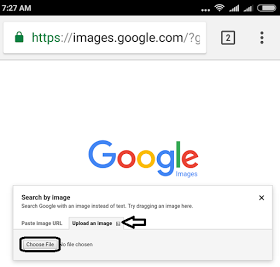
4 Click on the image upload tab and choose your desire image to upload from your directory.
4.png

Once the image is done uploading, it will bring you the best search result.

5.png

No need of any app.

You can also perform Reverse Image Search on Facebook. Just follow the easiest steps below;
  1. Right-click a Facebook image in your Web browser and select "Properties" from the drop-down menu.
  2. Locate the "Address: (URL)" section and write down the second to last number. It should look like: 5102898
  3. Replace "ProfileID" in the following URL with the number that you copied: http://www.facebook.com/profile.... This results in a URL of: https://facebook.com/profile.php?id=182073391
  4. Copy the URL that you created in Step 3 and paste it into your Web browser. Press "Enter" to access the user's Facebook profile.
  5. Warning; You may have to be logged in to your Facebook account to access a user's profile.
  • Share This:  
  •  Facebook
  •  Twitter
  •  Google+
  •  Stumble
  •  Digg
Email ThisBlogThis!Share to XShare to Facebook
Newer Post Older Post Home

0 comments:

Post a Comment

Popular Posts

  • Call of Duty: Strike Team Android
    Game description:   Call of Duty: Strike Team : Call of Duty: Strike Team  - the USA was unexpectedly attack...
  • Stable Nougat 7.1.1 Rom For Infinix Note 3 Pro
    Hi everybody and users of Infinix Note 3 ace, here is something useful for all Infinix note 3 star users, its M.A.D Aosp in view of Android...
  • Completely Unlocked FIFA 14 v1.3.6 Mod and Data (No Root) Download, Install And Play
      EA Sport Android FIFA 14 has been the best Android football HD diversion so far because of its HD design, realness, disconnected elem...
  • Best 20 PPSSPP Games To Download & Enjoy On Your Android, Windows, iOS, BlackBerry 10 and Other Devices
      PPSSPP (an acronym for "PlayStation Portable Simulator Suitable for Playing Portably") is a free and open-source PSP emulat...
  • OS 10.3.2.2789 for all devices and Autoloaders
    OS and Radio links for SR 10.3.2.2514 (OS 10.3.2.2789 + Radio 10.3.2.2790) *  Operating Systems * QC8974: Blackberry Passport (Debric...

Blog Archive

  • ▼  2017 (43)
    • ►  October (4)
    • ▼  August (6)
      • "On-Screen" FingerPrint Scanner For Smartphones Co...
      • 11 Ways to Make Your Smartphone Battery Last Longer
      • Apple's IPhone 8; The Expectations
      • Nokia 9: Full Specifications Spotted on GFXBench L...
      • How to Perform Reverse Image Search on Google & Fa...
      • Nigeria Becomes a Manufacturer & an Exporter of Ca...
    • ►  April (2)
    • ►  March (17)
    • ►  February (14)
  • ►  2016 (31)
    • ►  December (4)
    • ►  October (3)
    • ►  September (5)
    • ►  June (2)
    • ►  May (13)
    • ►  April (1)
    • ►  January (3)
  • ►  2015 (111)
    • ►  November (6)
    • ►  October (93)
    • ►  September (12)

Labels

  • AFFORDABLE DATA PLANS
  • ANDROID
  • BLACKBERRY
  • BROWSING TIPS
  • COMPUTERS
  • IOS
  • NOKIA
  • ONLINE BANKING
  • TECHNOLOGY NEWS
  • WINDOWS PHONE

Translate

Powered by Blogger.

Categories

ANDROID (61) TECHNOLOGY NEWS (26) AFFORDABLE DATA PLANS (24) COMPUTERS (24) IOS (22) BROWSING TIPS (13) NOKIA (9) BLACKBERRY (7) WINDOWS PHONE (4) ONLINE BANKING (2)

Copyright © Home Of Technology | Powered by Blogger
Design by Ememovic™